Build one email that renders for every recipient — pull any field from your recipients’ table, reach straight into linked records with no rollups or lookups, and branch the content by who each person is. Preview it against real data, then send the batch through Resend. No CSV exports, no mail-merge.
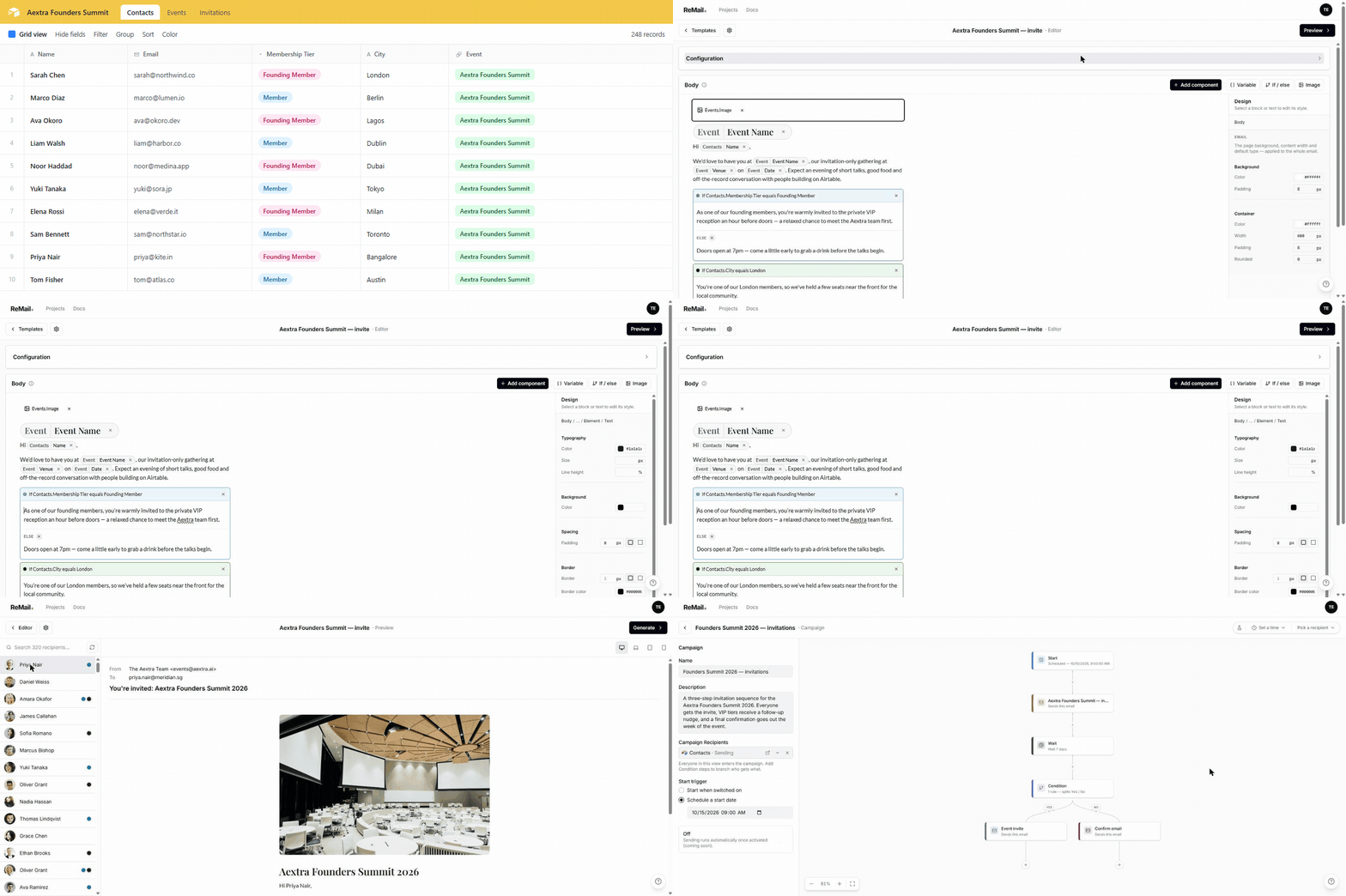
Different content for different people — one template
Build rules from a recipient’s own fields — equals, contains, is empty, and more — combine them with and/or, and add an else branch. Founding members get one paragraph, everyone else another, all from a single template. Stop maintaining five near-identical copies.
Preview every email against real recipients
The preview is the finished email for a real person — their data, their conditions resolved, their images loaded — at laptop, tablet and mobile widths. Condition dots next to each recipient show, at a glance, exactly which content they’ll get.
Everything a real send needs
A real email builder
Sections, columns, buttons and lists on Resend's React Email builder — drag to reorder, a “/” block menu, inline formatting. It compiles to real, email-safe HTML, not a WYSIWYG that breaks in Outlook.
Multi-step campaigns
Sequence emails into a campaign with waits and conditions between steps — the right message at the right time, driven by your Airtable data, not a single blast.
Linked records, natively
Point a variable through a linked field and use any value on the linked record directly — an event’s date on an invitee, a plan on a contact — with no rollups or lookups.
On-brand by default
Set fonts and colours once at the project level and every template inherits them — in the editor, the preview, and the sent email. Reuse the same brand across projects.
Images that don't break
Render an image from an Airtable attachment field, per recipient — served through stable, sealed URLs so they keep loading in the inbox instead of expiring.
Simulate before you send
A dry run builds every email and shows exactly who would receive what — sending nothing. Design and validate a whole campaign with only an Airtable key.
From a view to a sent batch
Connect
Point a project at Airtable with one key. Add Resend later — only when you’re ready to actually send.
Point
Aim a template at an Airtable view. Its rows become your recipients; its fields become your content.
Compose
Write one email with variables and conditional sections — the same template renders differently per person.
Preview
Click through real recipients and see each finished email, with their data and conditions resolved.
Send
Simulate the whole run with nothing sent, then deliver the batch through Resend when it’s right.
ReMail is in early access
Built on Airtable and Resend by the VibeKit team. Sign up and start sending.